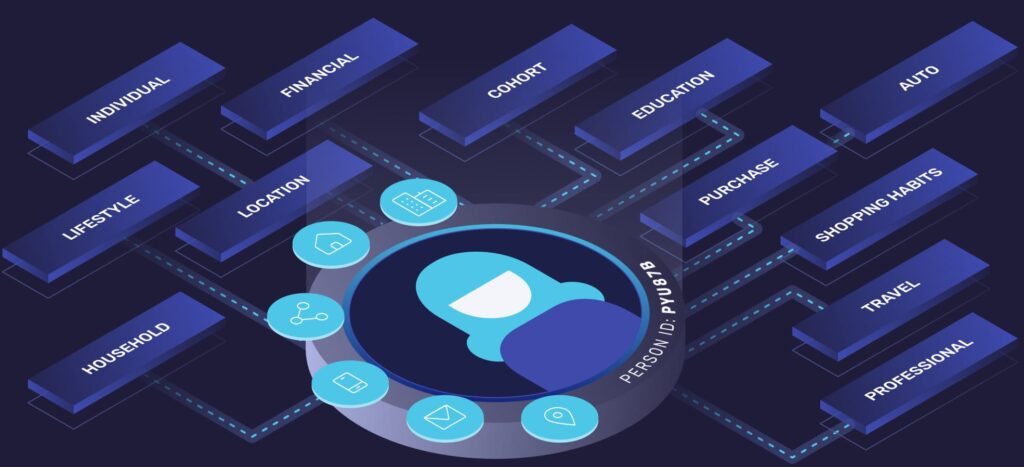
Configuring visitor tracking systems involves implementing code snippets, setting up data collection parameters, and ensuring proper monitoring across all digital touchpoints. Modern tracking systems identify website visitors through cookies, pixels, and device fingerprinting to build comprehensive user profiles. Proper configuration requires technical setup, privacy compliance, and ongoing optimization to maximize data accuracy and business insights.
What is visitor tracking and why is it essential for modern businesses?
Visitor tracking is technology that monitors and identifies users as they interact with websites, mobile apps, and other digital platforms. These systems collect data about user behavior, preferences, and engagement patterns to create detailed profiles of individual visitors and their journeys across multiple touchpoints.
The core functionality centers on identity resolution—connecting various digital identifiers like cookies, email addresses, device IDs, and IP addresses to recognize the same person across different devices and sessions. This creates a unified view of each customer’s interactions with your brand.
Modern businesses rely on visitor tracking for several critical functions. Personalization engines use tracking data to deliver customized content, product recommendations, and targeted messaging that resonates with individual preferences. Analytics teams analyze visitor patterns to optimize website performance, identify conversion bottlenecks, and improve user experience design.
Website lead identification becomes significantly more powerful with proper tracking implementation. Rather than capturing only form submissions, businesses can identify anonymous visitors and understand their interests before they provide contact information. This enables proactive engagement and more effective lead nurturing strategies.
How do you choose the right visitor tracking system for your needs?
Selecting appropriate visitor tracking technology depends on your business size, technical capabilities, data requirements, and integration needs. The choice between first-party and third-party solutions significantly impacts implementation complexity and data ownership.
First-party tracking systems collect data directly through your own domains and servers. These solutions offer greater control over data quality, privacy compliance, and long-term reliability. They’re particularly valuable as third-party cookie restrictions increase across browsers.
Third-party tracking relies on external services to collect and process visitor data. While often easier to implement initially, these systems face increasing limitations due to privacy regulations and browser restrictions on cross-site tracking.
Key evaluation criteria include real-time processing capabilities, API response times, data enrichment features, and integration compatibility with existing marketing technology stacks. Consider whether you need basic analytics or advanced features like cross-device identification and offline data matching.
Enterprise organizations typically require robust identity graphs that can handle high data volumes and complex customer journeys. Smaller businesses might prioritize ease of implementation and cost-effective solutions that provide essential tracking without overwhelming technical requirements.
What are the essential steps to configure visitor tracking correctly?
Proper visitor tracking configuration follows a systematic implementation process, starting with technical setup and ending with comprehensive testing across all user scenarios. The process ensures accurate data collection while maintaining website performance and user experience.
Begin by installing tracking codes on all relevant pages and digital properties. This typically involves adding JavaScript snippets to website headers or using tag management systems for more complex implementations. Ensure tracking codes load properly without affecting page speed or functionality.
Configure tracking parameters to capture the specific data points your business needs. Common parameters include page views, button clicks, form interactions, scroll depth, and time spent on different sections. Set up event tracking for important user actions like downloads, video plays, or product views.
Cross-domain tracking requires additional configuration when visitors move between different domains you own. Implement proper domain linking to maintain visitor identity across your entire digital ecosystem, including subdomains and separate branded websites.
Testing procedures should verify data accuracy across different browsers, devices, and user scenarios. Check that tracking fires correctly on mobile devices, tablets, and desktop computers. Validate that data appears accurately in your analytics dashboard and integrates properly with other business systems.
How do you ensure visitor tracking compliance with privacy regulations?
Privacy compliance for visitor tracking requires understanding applicable regulations like GDPR, CCPA, and other regional data protection laws. These regulations mandate specific consent mechanisms, data handling practices, and user rights that directly impact tracking implementation.
Implement consent management systems that clearly explain data collection practices and allow users to control their privacy preferences. Ensure tracking only begins after obtaining proper consent, and respect user choices about data collection and processing.
Data anonymization techniques help reduce privacy risks while maintaining analytical value. Consider implementing IP address masking, user ID hashing, and data aggregation methods that provide insights without compromising individual privacy.
Maintain transparent privacy policies that accurately describe your tracking practices, data usage, and retention policies. Provide clear mechanisms for users to access, modify, or delete their data as required by applicable regulations.
Regular compliance audits ensure your tracking configuration continues to meet legal requirements as regulations evolve. Document your data processing activities and maintain records that demonstrate compliance with privacy obligations.
What common visitor tracking configuration mistakes should you avoid?
Duplicate tracking codes represent one of the most frequent implementation errors, causing inflated metrics and inaccurate data analysis. This occurs when tracking scripts are added multiple times through different methods or when team members unknowingly implement redundant tracking systems.
Incorrect parameter settings can lead to data quality problems that undermine business insights. Common issues include misconfigured conversion goals, improper event tracking setup, and incorrect attribution models that don’t reflect actual customer behavior patterns.
Cross-domain tracking failures prevent businesses from understanding complete customer journeys when visitors move between different websites or subdomains. This creates fragmented data that misrepresents user engagement and conversion paths.
Data sampling issues occur when tracking systems don’t capture complete visitor information due to browser restrictions, ad blockers, or technical limitations. Understanding these gaps helps interpret analytics data more accurately and avoid misguided business decisions.
Troubleshooting methods include regular data audits, comparison with other data sources, and systematic testing of tracking implementation. Monitor for sudden changes in data patterns that might indicate configuration problems or technical issues affecting data collection accuracy.
Successfully implementing visitor tracking systems requires balancing comprehensive data collection with privacy compliance and technical performance. The right configuration provides valuable insights for lead identification and conversion optimization while respecting user preferences and regulatory requirements. If you’re ready to enhance your visitor tracking capabilities and improve your lead identification strategies, we’d be happy to help you explore the best solutions for your specific needs—please contact our team for personalized guidance.